
As an Amazon Associate, I earn from qualifying purchases. This means I may earn a commission if you purchase through links on this page — at no extra cost to you.
By Ella Knight
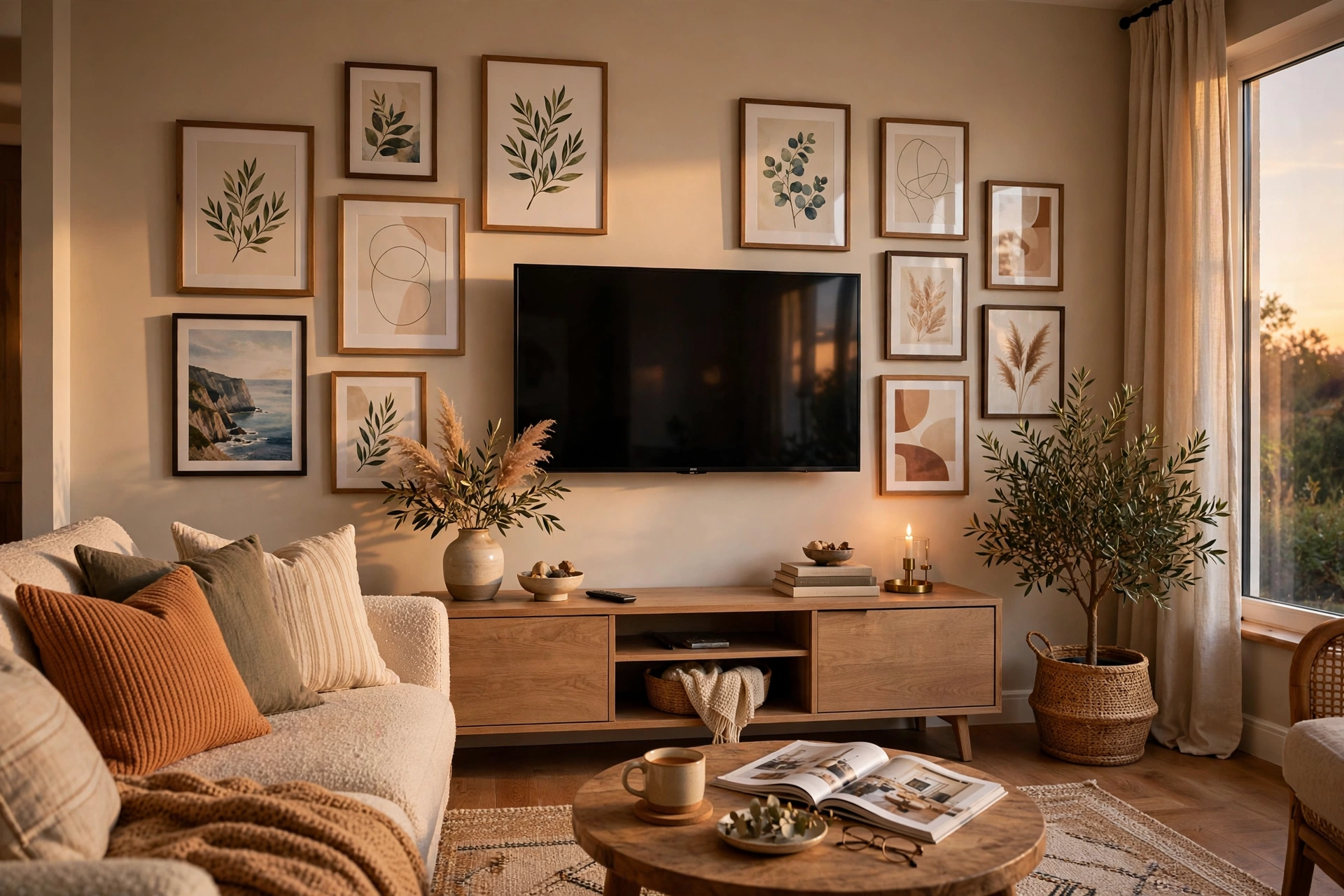
To build a gallery wall around a TV, treat the television as the anchor piece and arrange smaller frames around it, keeping 3-4 inches of clearance on all sides. Use a mix of frame sizes (5×7 to 11×14 inches), stick to a cohesive color palette, and keep the overall arrangement symmetrical enough that the TV doesn’t look like an afterthought. Related: Space Do You Need Around Furniture? Clearance Guide.
Why It Works
A bare TV on a large wall looks like a black hole. Surrounding it with art transforms it from an eyesore into part of a curated display. When the TV is off, the gallery wall shines. When it’s on, the frames become an attractive border.
Planning Your Layout
Measure Your TV
Note the exact width and height. Your gallery should extend at least 6-8 inches beyond the TV on each side for proper proportion.
Choose Your Frames
Smaller frames (5×7, 8×10) work best around a TV — they won’t compete for attention. Stick to 6-10 pieces depending on wall size.
Keep a Consistent Palette
Black frames with black-and-white art create a sleek media wall. For warmth, try natural wood frames with colorful prints.
Hiding Cables
- Run cables through a paintable cord cover down to the console
- Use a recessed outlet behind the TV if possible
- Choose a low console table to hide power strips and devices
- Wireless HDMI transmitters eliminate one cable entirely
Layout Options
Symmetrical Frame
Equal frames on left and right of the TV, with a row above. Clean and balanced.
Asymmetrical Cluster
Varied sizes arranged organically. More visual interest, slightly harder to plan.
🛒 Shop This Look:
Grid Extension
Continue a grid pattern from beside the TV to above it. Very modern.
What to Avoid
- Frames that reflect the TV screen (use non-glare acrylic)
- Hanging anything directly above that blocks ventilation
- Busy patterns right next to the screen (distracting when watching)
Sizing: Getting the Proportions Right
The number one mistake in TV gallery walls is proportion — usually a TV that’s too small for the wall with a timid scattering of tiny frames around it, or frames crowded so close they look like they’re afraid of the screen. Let’s get the math of it right.
Start with the TV itself. For the gallery wall to feel intentional, the total arrangement — TV plus frames — should span roughly two-thirds to three-quarters of the wall’s width. Measure your wall, multiply by 0.7, and that’s your target total width. If your TV is 48 inches wide on a 120-inch wall, your gallery needs to extend about 18 inches beyond the TV on each side. That extension is where your frames live.
Frame sizes around a TV should step down clearly from the screen. If the TV is the giant, your largest frames should be mediums — 8×10 to 11×14 — so there’s a clear size hierarchy: TV first, frames second. Frames approaching the TV’s visual weight compete with it and create tension; frames clearly smaller read as a supporting cast. Keep 3–4 inches of clearance between the TV’s edge and the nearest frame on all sides — tighter looks cramped, wider disconnects the composition.
Height placement needs a compromise between two ideals. Gallery convention centers art at 57 inches; TV ergonomics put the screen’s center at seated eye level, roughly 42–48 inches. Split the difference: mount the TV so its center sits around 48–52 inches, then build the gallery around it with the overall arrangement’s visual center near 55 inches. In practice, this means the TV sits slightly lower than a pure gallery would place it, and the frames above it balance the composition. Nobody notices the compromise; everybody notices when the TV is mounted at standing eye level like an airport departures board.
Don’t forget the console below. A media console should be wider than the TV — ideally extending at least a few inches beyond each side — and the gallery above should roughly align with the console’s width. This vertical alignment (console, TV, gallery sharing the same visual column) is what makes the whole wall read as one designed unit rather than three separate decisions.
The Frame TV Alternative (and How to Fake It)
Art-mode TVs with flush wall mounts have made the “TV that looks like framed art” mainstream — but you don’t need a four-figure display to get most of the effect. Here’s the honest breakdown of the options.
The real thing — a TV designed with an art mode, matte display, and flush mount — genuinely transforms a room. When idle, it displays artwork instead of a black rectangle, and the difference in a living room is dramatic. The catch is cost: these displays run several times the price of a comparable regular TV, and the art subscriptions add ongoing cost. Worth it if the TV dominates your main living space and the black-rectangle look genuinely bothers you daily.
The convincing fake costs under $50. A matte anti-glare screen protector (cut to your TV’s size) kills the mirror-like reflections that scream “television” and gives the screen a softer, more art-like surface. Pair it with a slim frame kit — magnetic or adhesive frames that attach around the TV’s bezel in wood, black, or brass finishes — and from across the room, the TV reads as a large framed piece. Set the TV’s screensaver to a favorite artwork or a slow slideshow of your own photos, and the illusion is surprisingly complete when you’re not actively watching.
🛒 Shop This Look:
Whichever route you take, the gallery around it still matters. A Frame-style TV floating alone on a big wall still looks like a TV; it’s the surrounding frames that sell the “art wall that happens to show movies” effect. Budget for the gallery too — the TV upgrade and the frames work together, not separately.
One practical note: art-mode displays and long screensaver sessions use power and can contribute to screen wear over time. Use the sleep timer, and don’t leave static art on an OLED screen for many hours daily. For most households, having the art display active during the day and the TV fully off at night is the sensible balance.
Sound, Glare, and Viewing Comfort
A gallery wall around a TV has to work as a viewing environment, not just a visual composition. Three practical issues deserve planning: sound, glare, and seating.
Sound: If you use a soundbar, it needs a home that doesn’t wreck the gallery’s symmetry. The cleanest solution is mounting the soundbar directly below the TV, tight against it — it reads as part of the TV unit. Alternatively, place it on the console below, centered. What doesn’t work is a soundbar floating off to one side or perched where a frame should be. If you’re running a full surround system, keep side speakers low and out of the gallery’s visual field — speakers at ear level beside the sofa disappear; speakers mounted mid-wall compete with your frames.
Glare: Glass-fronted frames near a TV are glare machines — every lamp and window in the room gets a second showing in your peripheral vision while you watch. Within the gallery immediately around the TV, use non-glare acrylic instead of glass. It’s lighter (easier hanging), shatter-resistant, and dramatically cuts reflections. Reserve real glass for frames farther from the screen or in rooms where the TV is rarely the focus. Also check the TV’s own position relative to windows: if the screen catches window glare, no frame arrangement fixes that — solve the TV placement first.
Viewing comfort: The ideal TV height (screen center at seated eye level) conflicts slightly with the ideal gallery height, as discussed above. The tiebreaker is viewing time: if this TV hosts nightly movies, prioritize the lower, ergonomic position and let the gallery adapt. If it’s a secondary TV that’s mostly decorative, prioritize the gallery composition. Also consider seating distance — the old rule of 1.5 to 2.5 times the screen’s diagonal for viewing distance still holds, so make sure your sofa placement works with the wall before you hang a single frame.
Frame and Art Choices That Flatter a TV Wall
What you hang around the TV matters as much as where you hang it. The screen is a big black rectangle that dominates whenever it’s off — your art choices should either embrace that darkness or deliberately counter it.
Embrace the dark: Black frames with black-and-white photography create a sleek, cohesive media wall where the TV disappears into the composition. This is the lowest-risk approach and it looks intentional in modern and minimalist rooms. Add one metallic accent — a brass frame or a gold-toned print — to keep it from feeling flat.
Counter with warmth: Natural wood frames with colorful art make the TV feel like one element among many rather than the undisputed focal point. This works beautifully in eclectic, bohemian, and traditional rooms where a wall of black rectangles would feel cold. The color and texture variety draws the eye across the whole arrangement instead of locking onto the screen.
Content guidance: Favor simple, bold images near the screen — abstracts, landscapes, typography — and save detailed, text-heavy pieces for the outer edges. Busy content right beside the screen competes for attention while you’re watching; calm content frames the viewing experience. Avoid anything with faces staring directly at the viewer immediately adjacent to the screen — it’s subtly distracting in peripheral vision during movies.
The reflection rule: Within about two feet of the TV on any side, use non-glare acrylic instead of glass on every frame. Reflections of the moving screen in nearby glass are distracting, and reflections of room lights in glass near a dark screen are doubly so. This one material swap does more for viewing comfort than any arrangement tweak.
🛒 Shop This Look: